
Smart light bulbs work by connecting to your Wi-Fi network or using Bluetooth, allowing you to control them through a smartphone app or voice assistant. They utilize LED technology for energy efficiency and can be programmed for different colors, brightness levels, and schedules, enhancing convenience and ambiance in your home.
Last updated: August 17, 2026
Smart light bulbs are advanced devices that enhance your home lighting experience through innovative technology. By understanding how smart light bulbs work, you can transform your living space with added convenience and improved energy efficiency. This guide covers their technology, setup, controls, benefits, and maintenance.
- Start with the setup: Device model, OS, ports, power needs, and workspace change the right answer.
- Check compatibility first: Verify specifications, drivers, firmware, app support, warranty, and return policy before acting.
- Use practical steps: Change one setting or product variable at a time so you can see what.
- Know the limits: Tech advice varies by model, brand, operating system, retailer, firmware version, and official support.
How Do Smart Light Bulbs Work?
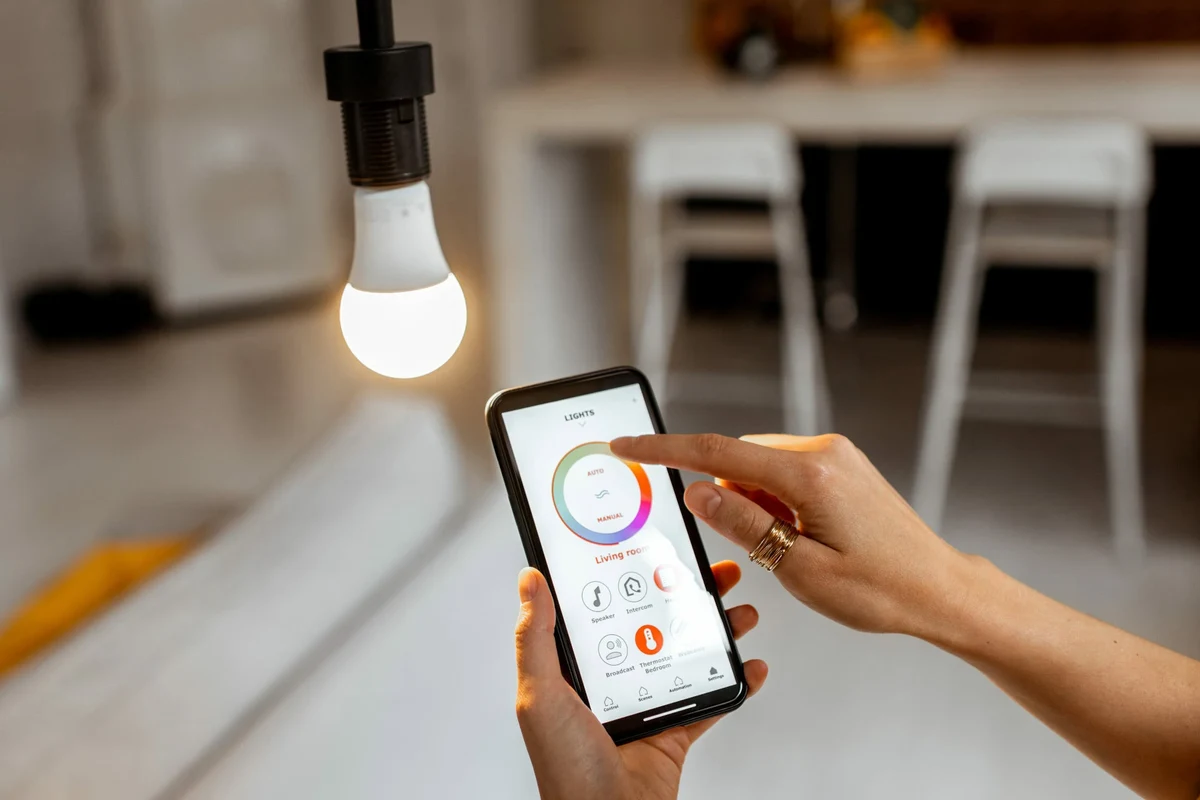
Smart light bulbs connect to your home network using wireless technology, enabling remote control through apps or voice commands. They typically utilize LED technology, known for its energy efficiency and long lifespan. Understanding the technology and mechanisms behind these bulbs helps maximize their use. For related context, you may also want to read how to setup gosund smart plug.
Understanding Smart Lighting Technology
Smart lighting technology combines traditional lighting with advanced electronics. Understanding its components and connectivity options is essential for making the most of your smart bulb experience. Here’s a closer look at the key elements that make smart light bulbs function effectively.
Key Components of Smart Light Bulbs
Smart light bulbs consist of several key components that work together to provide their functionality. These include LED light sources, wireless communication modules, and onboard processors. Each component plays a vital role in how the bulb operates and integrates with your smart home.
- LED Light Source: The primary component responsible for illumination, known for its energy efficiency and longevity.
- Wireless Communication Module: Allows the bulb to connect to your home Wi-Fi or Bluetooth, enabling remote control.
- Onboard Processor: Handles commands from your app or voice assistant, processing data to adjust lighting settings.
How Smart Bulbs Connect to Your Network
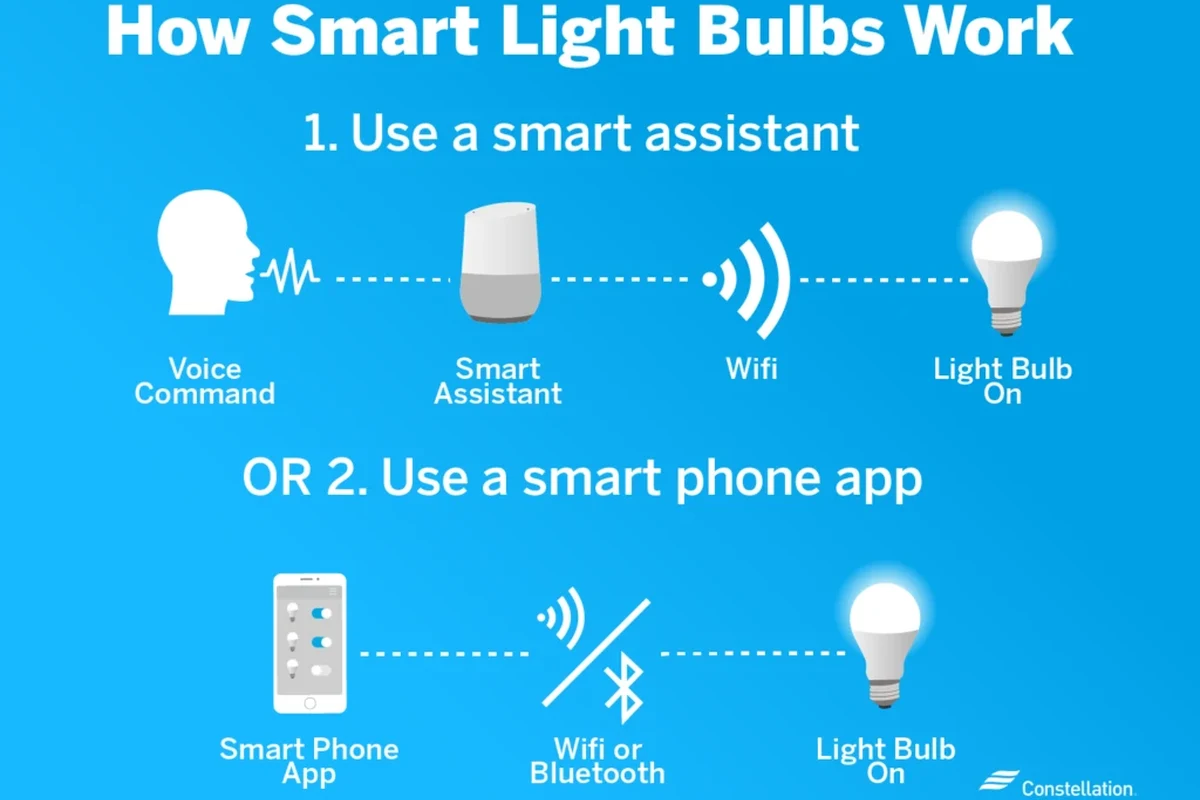
Smart light bulbs typically connect to your home network using Wi-Fi or Bluetooth. This connectivity allows you to control them from your smartphone or through voice commands via smart assistants. Understanding the connection method is crucial for effective setup and use.
Wi-Fi Connection: Most smart bulbs connect through your home Wi-Fi network, enabling remote access from anywhere. Bluetooth Connection: Some models use Bluetooth for local control without the need for an internet connection. Hub-based Systems: Certain smart bulbs require a hub for connectivity, which acts as a central point for managing multiple devices. You can also use how to setup smart plug with alexa as a helpful next guide on the same setup or usability topic.
Use this guide for how do smart light bulbs work as a practical checklist, then adjust the advice to your exact device model, operating system, workspace, and budget.
Setting Up Your Smart Light Bulbs
Setting up smart light bulbs is a straightforward process, but it can be prone to common mistakes. Following a clear installation process can ensure a smooth experience. Below are the steps to properly install your smart bulbs.
| Step | Description |
|---|---|
| 1. Choose Location | Select a suitable light fixture for your smart bulb. |
| 2. Install Bulb | Screw the smart bulb into the fixture and ensure it’s secure. |
| 3. Power On | Turn on the light switch to power the bulb. |
| 4. Connect to App | Download the manufacturer’s app and follow the pairing instructions. |
Step-by-Step Installation Process
Here’s a detailed guide to help you install your smart light bulbs effectively. By following these steps, you can avoid common pitfalls and enjoy the benefits of smart lighting.
- Choose the Right Bulb:
Check compatibility with your fixtures and smart home system.
- Install the Bulb:
Replace your existing bulbs with the smart bulbs, ensuring they are securely fitted.
- Download the App:
Download the corresponding app for your smart bulb to your smartphone.
- Connect to Wi-Fi:
Follow app instructions to connect the bulb to your home Wi-Fi network.
- Set Up Controls:
Configure your preferences in the app for brightness, color, and scheduling.
Common Setup Mistakes to Avoid
Common setup mistakes can lead to connectivity issues or poor performance with smart light bulbs. Ensure your bulbs are compatible with your smart home system and follow the manufacturer’s instructions carefully to avoid unnecessary headaches during installation. For related safety context, compare this with how to setup kasa smart plug.
- Ignoring Compatibility: Always check if the bulb is compatible with your smart home ecosystem.
- Overloading Circuits: Avoid connecting too many smart bulbs on a single circuit to prevent overload.
- Skipping Firmware Updates: Regularly check for app updates to ensure all features work smoothly.
Small details such as port type, charger wattage, firmware version, desk space, and app permissions can completely change the right answer.
Controlling Smart Light Bulbs: Options and Features
The ability to control smart light bulbs is one of their key benefits. You can manage these devices through mobile apps or voice commands, providing flexibility in how you adjust your lighting. Various control methods enhance user experience and convenience.
Using Mobile Apps for Smart Bulb Control
Most smart light bulbs come with a dedicated mobile app, allowing users to control lighting settings from their smartphones. These apps provide a range of features to enhance your lighting experience.
Remote Control: Adjust brightness and color from anywhere in your home. Scheduling: Set timers to automate lighting based on your routine. Scene Creation: Create customized lighting scenes for different occasions.
Voice Control with Smart Assistants
Many smart light bulbs are compatible with voice assistants like Amazon Alexa, Google Assistant, and Apple HomeKit. This feature allows for hands-free control, making it convenient to adjust lighting without reaching for your phone. For related context, you may also want to read how to setup amazon smart plug.
- Voice Commands: Control your lights with simple phrases like “turn on the living room lights.”
- Integration with Other Devices: Sync your lighting with other smart home devices for seamless automation.
- Custom Routines: Set routines such as “Good Night” to turn off all lights at once.
Benefits of Using Smart Light Bulbs
Smart light bulbs offer several advantages over traditional lighting options. Understanding these benefits can help you decide whether to invest in them for your home.
Energy Efficiency and Cost Savings
One of the most significant benefits of smart light bulbs is their energy efficiency. Using LED technology, these bulbs consume less power than traditional incandescent bulbs, leading to lower electricity bills.
Long Lifespan: Smart bulbs typically last up to 25,000 hours, reducing replacement costs. Reduced Energy Consumption: They use up to 80% less energy than traditional bulbs. Light Automation: Schedule lights to turn off when not in use, further decreasing energy costs.
Enhanced Home Security Through Smart Lighting
Smart lighting can significantly bolster your home security by simulating activity when you’re away. Utilize scheduling features or remote access to turn lights on and off, which can effectively deter intruders and provide peace of mind. This connects closely with how to setup smart plug if you want to compare the topic in more detail.
- Remote Access: Control lights while away from home to mimic your presence.
- Motion Sensors: Some smart bulbs can integrate with motion detectors to automatically light up when movement is detected.
- Scheduled Lighting: Set timers to turn lights on and off at specific times, enhancing security.
- Verify specs before buying or changing your setup.
- Keep damaged cables, weak mounts, and overheating devices out of use.
- Prefer simple, reversible fixes before advanced changes.
Compatibility: What You Need to Know
Understanding compatibility is crucial when selecting smart light bulbs. Various devices and ecosystems may affect how well your bulbs function together. Here’s what to consider.
Which Devices Work with Smart Bulbs?
Smart light bulbs are compatible with a variety of devices, expanding their functionality. Knowing which devices can work with smart bulbs allows you to make the most of their features. This compatibility can enhance your overall smart home experience.
Smart Hubs: Many bulbs work with hubs like Samsung SmartThings or Philips Hue Bridge. Smart Assistants: Integration with Alexa, Google Assistant, and Apple HomeKit is common. Mobile Devices: Ensure your smartphone or tablet is compatible with the bulb’s app.
Operating System and Ecosystem Considerations
Compatibility can also vary based on the operating system of your mobile device. Understanding these nuances can help ensure a smooth experience when using smart light bulbs. You can also use how to connect kasa smart plug step by step guide as a helpful next guide on the same tech-accessories topic.
- iOS and Android: Most popular smart bulb apps support both operating systems.
- Firmware Updates: Keep your smart bulb’s firmware updated for optimal performance.
- Home Automation Systems: Check if the bulb is compatible with your existing home automation system.
Safety and Privacy with Smart Light Bulbs
While smart light bulbs offer numerous conveniences, they do come with potential safety and privacy risks. Regularly update your device’s firmware and secure your Wi-Fi network to protect against unauthorized access and ensure a safer smart home environment.
Data Privacy Concerns
Smart light bulbs collect data to function effectively, raising potential privacy issues. Being aware of how this data is used is essential for safeguarding your information.
Data Sharing: Review privacy policies to understand how your data is shared. Account Security: Use strong passwords and enable two-factor authentication if available. Network Security: Ensure your home Wi-Fi network is secure to prevent unauthorized access.
Electrical Safety Tips
Maintaining electrical safety is essential when using smart light bulbs. Always turn off the power at the circuit breaker before installation or maintenance, and check for any signs of wear or damage to prevent electrical hazards. For related safety context, compare this with how to connect kasa smart plug to new wifi easily in minutes.
- Use Compatible Fixtures: Ensure your light fixtures are rated for smart bulbs.
- Avoid Overloading Circuits: Don’t connect too many bulbs to a single circuit to prevent overload.
- Regular Inspections: Check for any signs of damage or wear on the bulb or fixture.
Check the official manual, support page, and warranty details when specifications, compatibility, safety, or replacement decisions matter.
Maintaining Your Smart Light Bulbs
To keep your smart light bulbs performing at their best, regular maintenance is essential. Clean the bulbs gently to remove dust and ensure good connectivity, and check for any software updates that could enhance functionality and performance.
How to Troubleshoot Common Issues
Being prepared to troubleshoot common issues can enhance your experience with smart light bulbs. Before contacting support, check your internet connection and ensure that your bulbs are properly configured within your smart home app for quick resolutions.
Connection Problems: Restart your router and the bulb if they lose connectivity. App Issues: Ensure you have the latest version of the app installed on your device. Resetting the Bulb: Follow the manufacturer’s instructions to reset the bulb if necessary.
When to Replace Your Smart Bulbs
Identifying when to replace your smart bulbs is crucial for maintaining effective lighting. Monitor for flickering, dimness, or connectivity issues, as these signs often indicate that it’s time for a replacement to ensure optimal functionality. This connects closely with how to factory reset kasa smart plug if you want to compare the topic in more detail.
- Flickering Lights: Persistent flickering may indicate a failing bulb.
- Reduced Brightness: If the bulb is dimmer than usual, it may be nearing the end of its lifespan.
- Connectivity Issues: Frequent disconnections from the network can signal the need for a replacement.
- Start with device model, OS, ports, power needs, workspace, and budget.
- Check compatibility, dimensions, materials, safety, warranty, and return policy.
- Change one setup variable at a time when testing what works.
Alternatives to Smart Light Bulbs
While smart light bulbs offer distinct advantages, there are other lighting solutions that might suit your preferences. Exploring these alternatives can aid in making informed choices about your lighting needs and preferences.
Comparing Smart Bulbs with Traditional Lighting
Smart bulbs provide distinct advantages over traditional lighting options, such as enhanced control and energy efficiency. When comparing, consider your specific needs for automation and compatibility with existing devices to make an informed choice.
| Feature | Smart Bulbs | Traditional Bulbs |
|---|---|---|
| Energy Efficiency | Uses up to 80% less energy | Less efficient, higher energy costs |
| Longevity | Lasts up to 25,000 hours | Typically lasts 1,000 hours |
| Control | Remote access and automation | Manual operation only |
Other Smart Home Lighting Solutions
Beyond smart light bulbs, various smart lighting solutions exist, such as smart plugs and smart fixtures. Exploring these options may enhance your home automation experience even further.
Smart Plugs: Control traditional lamps and fixtures using smart plugs. Smart Ceiling Lights: Integrated smart lighting fixtures provide built-in smart features. Smart Light Strips: Flexible lighting options that can be customized for various applications.
How Smart Light Bulbs Enhance Your Home’s Technology
Smart light bulbs can seamlessly integrate into your home’s technology, enhancing your overall experience. Explore compatibility with various smart home ecosystems to maximize functionality and ensure that your lighting setup complements your lifestyle.
Final Words
Smart light bulbs represent a significant advancement in home lighting technology. By understanding their functionality, setup, and benefits, you can make the most of these innovative devices. Whether enhancing your home’s ambiance or improving security, smart bulbs provide a versatile and efficient lighting solution.
💡 Sufiya Begom's Practical Advice: Match the advice to your exact model, daily use case, compatibility limits, safety requirements, and official support page before following generic tech guidance.
Frequently Asked Questions
Questions about Smart Bulb often depend on the exact model, connection method, software support, and daily use case. Similar products can behave differently even when they look alike or share a category name. Check current manufacturer documentation whenever compatibility, safety, privacy, firmware, or warranty details affect the answer.
Start with intended use, fit, verified specifications, safety instructions, care needs, and important limitations.
Start with the exact Smart Bulb model, connection method, compatibility requirements, and the specific result you need. Current manufacturer documentation is the safest place to confirm details that vary by model.
Check the operating system, ports or wireless standard, power requirements, app or driver support, and any ecosystem limitations that apply to the exact setup.
A common mistake is treating every Smart Bulb product or setup as interchangeable. Similar-looking models can differ in ports, software support, power needs, dimensions, or privacy controls.
Use the cleaning, ventilation, inspection, charging, storage, and update guidance that applies to the product type. Disconnect power first whenever the manufacturer instructions require it.
Stop and seek official support when the problem involves overheating, damaged power hardware, unstable mounting, repeated failures, data loss, or a privacy concern you cannot resolve safely.

Sufiya Begom is a Passionate Digital Innovator and the Visionary Founder of the Dynamic Platform, Digital Pro Info. With a deep-rooted enthusiasm for digital technologies, Sufiya has built a comprehensive space that offers valuable insights into digital products, reviews, guides, software, and sales, empowering individuals to make informed decisions in the ever-evolving digital landscape.